Projects · Video and content creation

Every video, ready for every platform, in one click

SocialConvert turns any video into the best-quality upload each social platform accepts, with 32 presets across 11 platforms, from Instagram and TikTok to WhatsApp Status, all processed on the user’s own computer.

SocialConvert
Product
SocialConvert
Industry
Video and content creation
What we did
Custom software, Workflow automation
Year
2026
At a glance
11Platforms supported, from Instagram and TikTok to Telegram
32Presets with exact resolution, frame rate and size rules
0Videos uploaded: every conversion runs on the user’s computer
The challenge

What was going wrong

A video that looks sharp on the phone that shot it often looks soft, blocky or washed out after posting. Each platform recompresses uploads to its own rules, and a file in the wrong size, frame rate, colour format or bitrate gets squeezed hardest.

Getting it right means knowing that Reels want exactly 1080×1920, that WhatsApp Status cuts clips at 60 seconds and caps files at 16 MB, that TikTok’s phone app rejects files over 287 MB, and that iPhone HDR footage turns grey on most apps. Social media teams either learn all of this or accept the quality loss, then export the same video five times for five platforms.

We wanted one tool where you drop in your videos, tick the platforms you post to, and get a folder of files that each platform will accept with as little recompression as possible.

The solution

What we built

We built SocialConvert, a desktop app with a simple browser interface that plans and encodes every upload for 11 platforms. It picks the right format for each video’s shape, handles framing, frame rate, HDR and size limits automatically, checks every file it makes, and keeps every video on the user’s own computer.

It needed to
  • Produce the highest-quality file each platform will accept, every time.
  • Turn one video into every format a social team needs in a single run.
  • Handle HDR, odd shapes and size limits without the user needing to know about them.
  • Keep videos private and on the user’s own computer.
  • Stay up to date as platforms change their rules, without reinstalling.
How it works

From start to finish

01

Add

  • Drop in videos or add by path
  • Resolution, fps, HDR read
  • Several videos at once
02

Choose

  • 11 platforms, 32 presets
  • Auto picks by video shape
  • Quality and framing options
03

Convert

  • Exact platform resolution
  • HDR to normal colour
  • Two-pass under size limits
04

Deliver

  • Every file checked
  • One folder per video
  • Plain, ready-to-post names
How we built it

The thinking behind it

  1. Research every platform

    We documented the published upload guidance and real-world limits for Instagram, TikTok, WhatsApp, X, YouTube, Facebook, LinkedIn, Threads, Snapchat, Pinterest and Telegram, and turned each into a preset with exact resolution, frame rate, bitrate, length and file size rules.

  2. Separate deciding from encoding

    A planning engine decides everything up front: output size, framing, frame rate, bitrate and whether a clip must be split, so users can preview exactly what will be made before anything is encoded. The encoder then turns each plan into an FFmpeg command.

  3. Protect quality at every step

    Videos are encoded at constant quality with a platform-appropriate cap, phone HDR is converted to normal colour, variable frame rates are made steady, and two-pass encoding lands files just under hard size limits.

  4. Make it friendly for non-technical teams

    The app runs as a small local server with a clean browser interface in light and dark mode that also works on a phone-sized window. Double-click to start, tick platforms, press Convert.

  5. Keep it current

    Platforms change their rules often, so the app checks for updates, installs new versions and refreshed presets with a backup of every replaced file, and never touches the user’s converted videos.

Inside

What it does

11 platforms, 32 presets

Instagram, TikTok, WhatsApp, X, YouTube, Facebook, LinkedIn, Threads, Snapchat, Pinterest and Telegram, including Reels, Stories, feed shapes, Shorts and 4K.

Auto format by shape

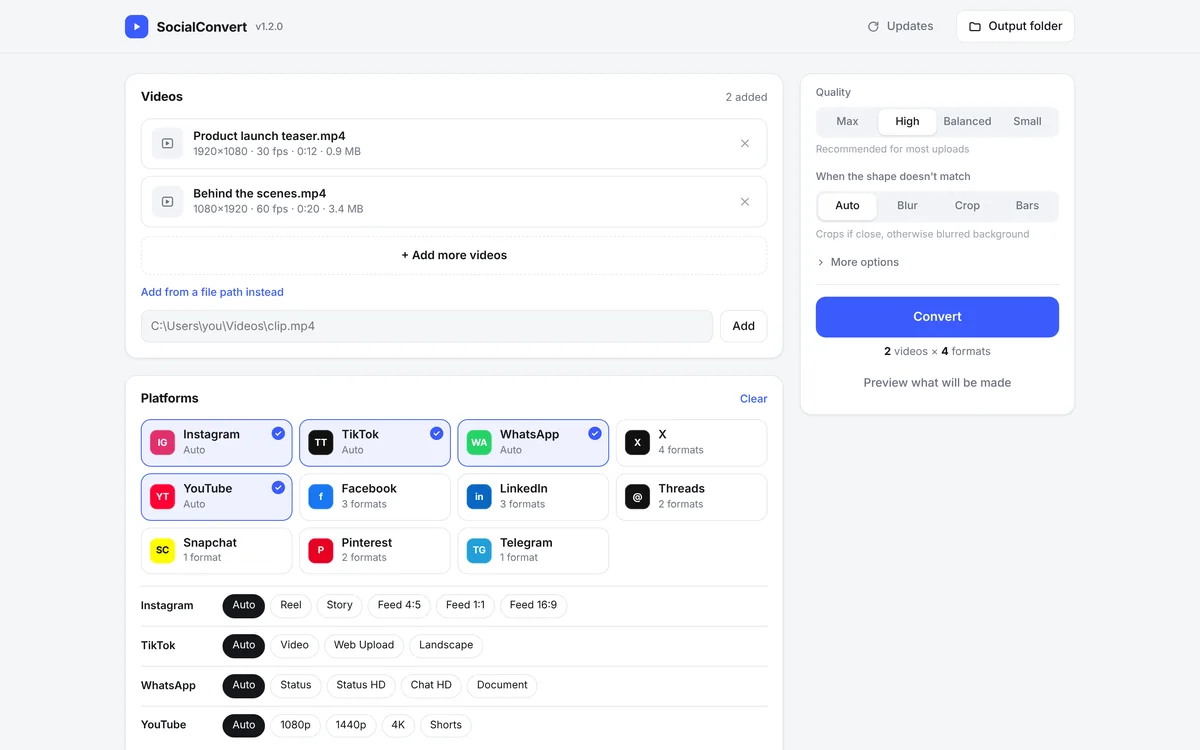
Each platform starts on Auto, which picks the right format for each video’s shape. Extra formats like Story, Feed 4:5 or Status HD can be ticked alongside.

Exact platform resolution

Files are made at exactly the size each platform shows, such as 1080×1920 for Reels and TikTok or 720p for WhatsApp HD, so the platform’s own resizing has nothing to do.

Smart framing

When the shape doesn’t match, SocialConvert crops if the difference is small and otherwise places the full picture over a blurred background, or uses black bars if preferred.

HDR to normal colour

iPhone and Android HDR footage is converted to standard colour, so it doesn’t look washed out or blown out after posting.

Frame rate handled

Frame rates are kept where a platform allows them and evenly halved where it doesn’t, and variable frame rate phone footage is made steady.

Lands under size limits

Two-pass encoding fits files just under hard limits like TikTok’s 287 MB, X’s 512 MB and WhatsApp Status’s 16 MB, and re-encodes once if a limit is missed.

Auto-split for Status and Stories

Long clips are split into 60-second parts for WhatsApp Status and Stories, named in order and ready to post.

Preview before converting

See every file that will be made, with its size, frame rate and length, plus warnings such as frame rate reductions, before a single frame is encoded.

Every output checked

After encoding, each file’s size and resolution are verified against the platform’s rules, and location and other metadata are removed.

Loudness and trimming

Optional loudness levelling to -14 LUFS, the level most platforms play at, plus trimming to a start and end time or to a platform’s maximum length.

Graphics card encoding

Use NVIDIA, Intel, AMD or Apple hardware encoders for much faster conversions, or the default CPU encoder for the best quality per megabyte.

Command-line tool

Convert whole folders to every platform in one command, preview the plan, inspect any video file and list every preset with tips.

One-click updates

Check for and install new versions and refreshed platform specs from inside the app, with backups of every replaced file and an optional automatic check.

Private and local

Everything runs on the user’s own computer and nothing is uploaded. The app only listens on that computer and refuses requests from other websites.
What changed

The difference

A social media team can now drop in a batch of videos, tick Instagram, TikTok, WhatsApp and YouTube, and get a folder per video with a correctly sized, correctly coloured, size-safe file for each, named plainly and ready to post.

The platform rules live in one presets file, so when a platform changes its limits, an update reaches every installed copy without anyone re-learning the specifications.

Your turn

Find the task that makes your customers wait.

Before anything is built, find out which leak is costing you most. It takes 2 minutes and it's free.

Next projectSEDIO: A full video editor that runs in the browser