Projects · Video and content creation

A full video editor that runs in the browser

SEDIO is a professional video editor we designed and built from scratch. It runs in any modern browser, edits on the creator’s own device, and uses AI for captions, voiceovers, background removal and sound separation.

SEDIO
Product
SEDIO
Industry
Video and content creation
What we did
Custom software, AI solutions
Year
2026
At a glance
0Videos uploaded: editing, AI and export all happen on the device
18Languages for automatic captions
27Automated test suites that run the real editor on real video
The challenge

What was going wrong

Short-form video drives attention for businesses and creators alike, but the tools to make it are split in two. Desktop editors are powerful but expensive, heavy and hard to learn. Phone apps are quick but cramped, watermark the export or lock key features behind a subscription.

Most online editors also upload every clip to a server before they can do anything. That is slow on Nigerian internet, uses up data, and means private footage sits on someone else’s computer.

We wanted an editor with the depth of desktop software, the speed of a phone app and the privacy of working offline: open a link, drop in footage, and export a finished Reel or TikTok without a single video leaving the computer.

The solution

What we built

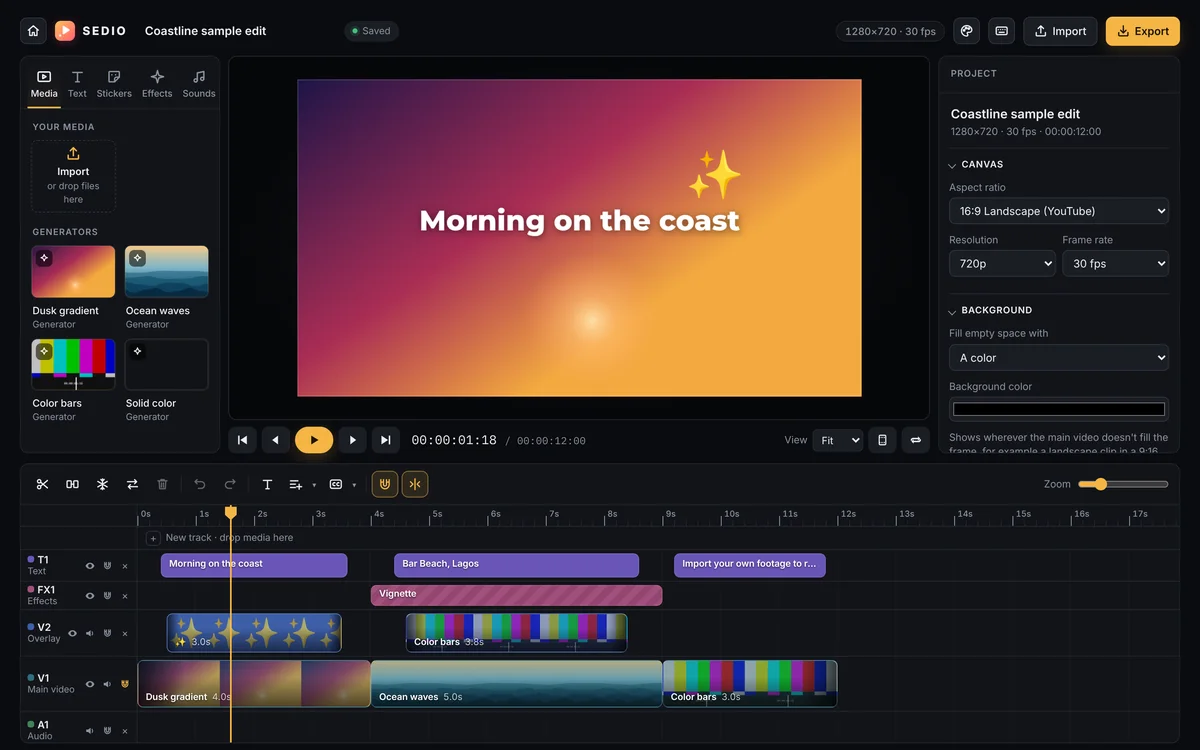
We built SEDIO, a multi-track video editor that runs entirely in the browser. Editing, effects, captions, voices and exports all happen on the device, with on-device AI models for speech, voices, people and sound, and Claude for caption clean-up. It installs as an app on Windows and works offline.

It needed to
  • Feel as capable as desktop editing software, without an install.
  • Keep every video, sound and caption on the user’s own device.
  • Turn hours of captioning, cutting and cleanup into one-click jobs.
  • Export straight to Instagram Reels and TikTok settings, ready to post.
  • Stay smooth on everyday laptops, even with 4K or long footage.
How it works

From start to finish

01

Bring in

  • Drop videos, photos, music
  • Pick 9:16, 16:9, 1:1 or 4:5
  • Proxies made for 4K footage
02

Edit

  • Multi-track timeline
  • Keyframes, masks, speed
  • Text, stickers, effects
03

Enhance with AI

  • Auto captions in 18 languages
  • Background removal
  • Voice cleanup and separation
04

Export

  • Reels and TikTok presets
  • Loudness levelled to -14 LUFS
  • Hardware-encoded MP4
How we built it

The thinking behind it

  1. Start with the timeline

    We built the editing core first: a main video track with as many video, text, effects and audio tracks above it as a project needs, with trimming, splitting, grouping, snapping and undo that feel as precise as desktop software.

  2. Render everything on the device

    Every frame is composed in the browser, with green screen and blend modes on the graphics card. Exports decode the original files directly and hand each frame to the computer’s hardware encoder, so a video renders as fast as the machine allows rather than in real time.

  3. Bring AI to where it saves hours

    Speech recognition, voices, background removal and sound separation run as AI models inside the browser, downloaded once and then used offline. Only caption text is ever sent to Claude, which fixes misheard words and picks the key words to highlight.

  4. Design for the platforms people post to

    Export presets follow Instagram’s and TikTok’s published upload guidance, level the sound to the loudness the apps play at, and flag any text that the apps’ own buttons would cover, with a safe-zone guide in the viewer while editing.

  5. Make it dependable

    SEDIO saves every couple of seconds, keeps several projects, exports portable project files, and reports errors anonymously so they get fixed. 27 automated test suites run the real editor in a browser against real video files.

Inside

What it does

Multi-track timeline

A main video track plus unlimited overlay video, text, effects and audio tracks. Trim, split, merge, group, copy and box-select clips, with magnetic tracks, snapping and full undo and redo.

Auto captions in 18 languages

SEDIO listens to the speech and writes timed captions that can light up word by word, plus auto lyrics for music videos, batch find and replace, and one style applied across every line.

AI enhanced captions with Claude

A more accurate speech model writes the transcript, then Claude fixes misheard names, spelling and punctuation to fit the story, while every line keeps the timing of the words actually spoken.

Key words, emojis and auto zoom

Claude picks the words that carry each caption and an emoji where one fits. Auto zoom then punches in on each key word as it is spoken, for the fast-paced style that keeps viewers watching.

Edit by transcript and text to speech

Delete words in the transcript to cut them from the video, remove filler words or long pauses in one click, and add voiceovers in 28 natural English voices.

AI background removal

Cut people out of their background with one click, no green screen needed, using a segmentation model that runs locally. A full chroma key with spill removal handles real green screens.

Auto reframe

Turns a landscape video into a vertical Reel by following the person in the shot, with a smooth camera or a close follow, per clip or for the whole edit.

Separate vocals, music and voice

AI splits a song into vocals, drums, bass and instruments, or a video’s sound into voice, music and effects. Make karaoke, remove background music, or put every part on its own track.

Voice cleanup and auto ducking

Removes hiss, hum and room noise learned from the clip’s own quiet moments and evens out the voice. Music dips automatically whenever someone speaks.

Sound library and beat sync

19 sound effects and 7 music beds, from Afrobeats and Amapiano to cinematic, free for commercial use. Beat sync finds a song’s beats and cuts the edit so every cut lands on one.

Text, stickers and effects

12 fonts, 15 ready-made text styles, typewriter, pop and glow animations, animated stickers, and effects from film grain and glitch to cinema bars and slow zoom.

Keyframes, masks and blend modes

Animate position, size, rotation, colour and volume. Shape masks with feathering, 16 blend modes, picture in picture, crop, rotate, rounded corners and compound clips.

Speed, stabilization and anti-flicker

Speed from 0.1× to 10× with curves and smooth slow motion, reverse and freeze frame, shake removal, and a fix for the flicker LED lights cause on camera.

Multi-camera and motion tracking

Line up two to four cameras by their sound and cut between them live with keys 1 to 4. Make text and stickers follow a moving subject.

Brand kit

Save brand colours, caption and title styles, a logo, an intro and an outro once, then apply them to any project in one click.

Fast export for Reels and TikTok

Presets for Instagram Reels, TikTok or both from one render, sound levelled to -14 LUFS, warnings for text the apps would cover, and hardware encoding that renders faster than real time.

Smooth with 4K and long videos

Large or long footage is edited through a lightweight copy made in the background, so playback stays smooth on any laptop. Exports always use the originals.

Private, offline and installable

Videos are never uploaded. Projects save automatically in the browser, back up as project files, and SEDIO installs as an app on Windows that works offline and updates itself.
What changed

The difference

SEDIO turns a laptop browser into a complete editing studio. A creator can drop in raw footage, get accurate captions with highlighted key words, clean up the sound, add music that lands on the beat and export a Reel and a TikTok from one render, all without uploading a file or installing heavy software.

It also shows the kind of product Ampliora builds beyond websites: complex, performance-critical software with AI woven into the everyday work, designed so non-experts can use it on the first day.

Your turn

Find the task that makes your customers wait.

Before anything is built, find out which leak is costing you most. It takes 2 minutes and it's free.

Next projectPaperwork Desk: Contracts, receipts and letters, ready the day they pay